


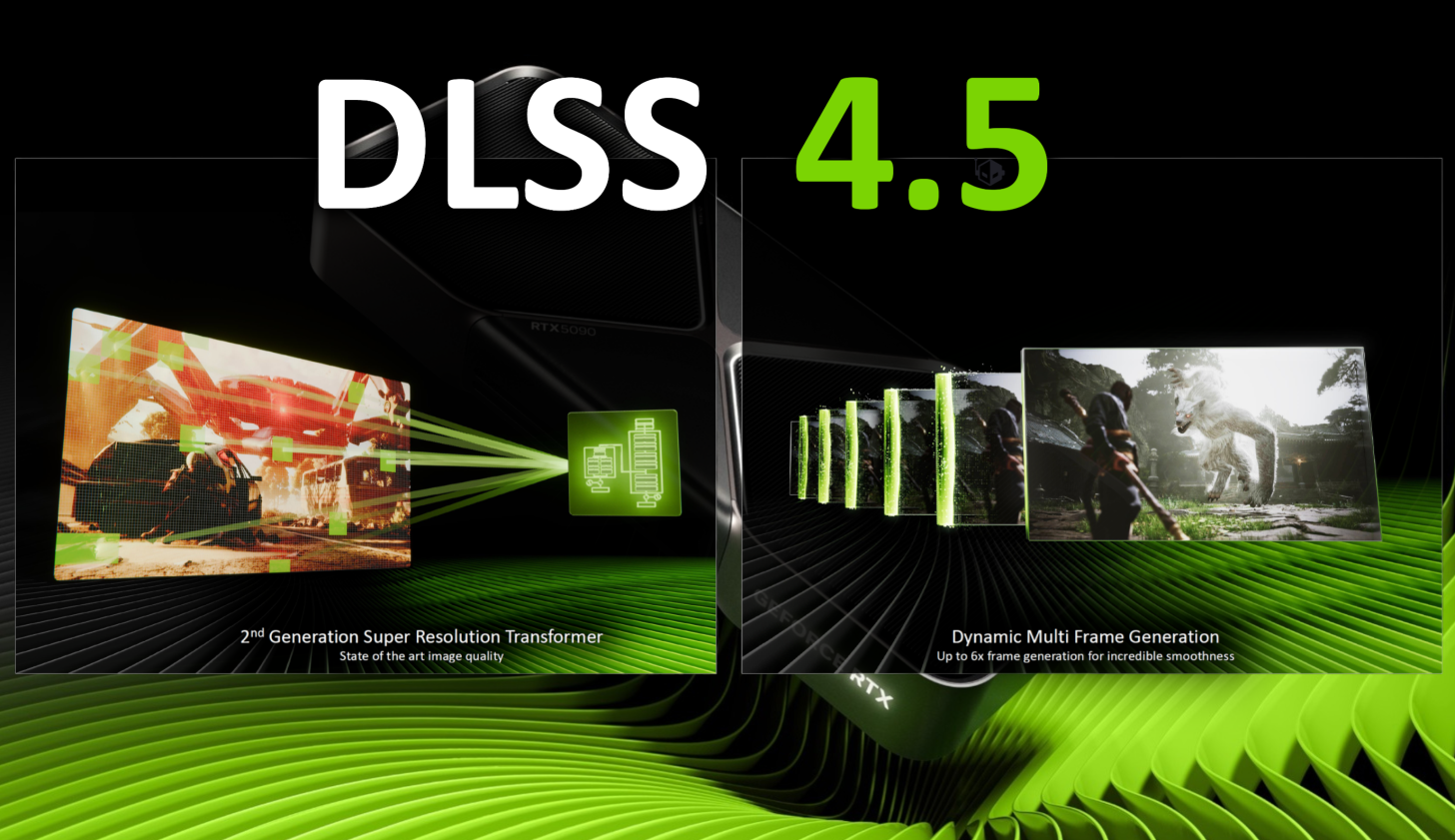
NVIDIA DLSS 4.5 is the latest version of its machine learning based (ML) temporal upscaling and frame generation technologies, officially released for all GeForce RTX GPU users via updates to the NVIDIA app and with support from their latest Game Ready driver in January 2026 (temporal upscaling part only). At its core, DLSS (Deep Learning Super Sampling) has long been a staple for PC gamers with RTX GPUs wanting to strike a balance between high performance and crisp visuals by rendering games at lower resolutions and using a deep neural network to upscale them to higher resolutions with minimal loss to visual fidelity.
The headline feature of DLSS 4.5 is its second-generation transformer model for Super Resolution (AKA temporal upscaling), which is a more advanced deep neural network trained on a much larger dataset that should, in theory, deliver significantly improved image reconstruction, anti-aliasing, and temporal stability compared to the first-generation transformer model. This would entail game rendering with finer edges, sharper details, and reduced visual artifacts (like shimmering and ghosting) in many titles, especially when using performance-oriented presets with more aggressive upscaling. Because this transformer model operates directly in linear space with more context awareness, it can preserve high contrast lighting and complex details more faithfully than previous models.
Alongside Super Resolution, DLSS 4.5 introduces a major overhaul to ML-powered frame interpolation with Dynamic Multi-Frame Generation (MFG) and a new 6X MFG mode, aimed exclusively at RTX 50 series GPUs, and coming later in spring 2026. The new update to DLSS MFG promises up to five additional generated frames per rendered frame, with the added ability to dynamically alter the amount of generated frames – from none up to 5 – in order to hit a specific framerate target, which is especially useful in high refresh rate monitors.
While the frame generation features will roll out gradually, DLSS 4.5 Super Resolution is available right now in hundreds of supported games, and it arguably represents a compelling leap forward in ML-powered temporal upscaling quality and flexibility. In this article, we’ll focus on the Super Resolution portion of DLSS 4.5 — how it differs visually from previous versions, how to enable it for testing, what real-world image quality gains or losses you can expect in certain games, and its performance impact vs the previous transformer model.
What Is DLSS 4.5? A Technical Breakdown
At a high level, DLSS 4.5 builds on DLSS 4 by upgrading the Super Resolution model to a second-generation transformer model with further enhancements to temporal upscaling fidelity, and further improving their Multi-Frame Generation technology by allowing for up to 5 generated frames, alongside the ability to dynamically alter the amount of generated frames to hit a certain performance target.
DLSS 4.5 Super Resolution
One of the core pillars of DLSS 4.5 is an updated transformer model for Super Resolution, AKA the temporal upscaling (or upsampling) part of the suite of DLSS technologies.
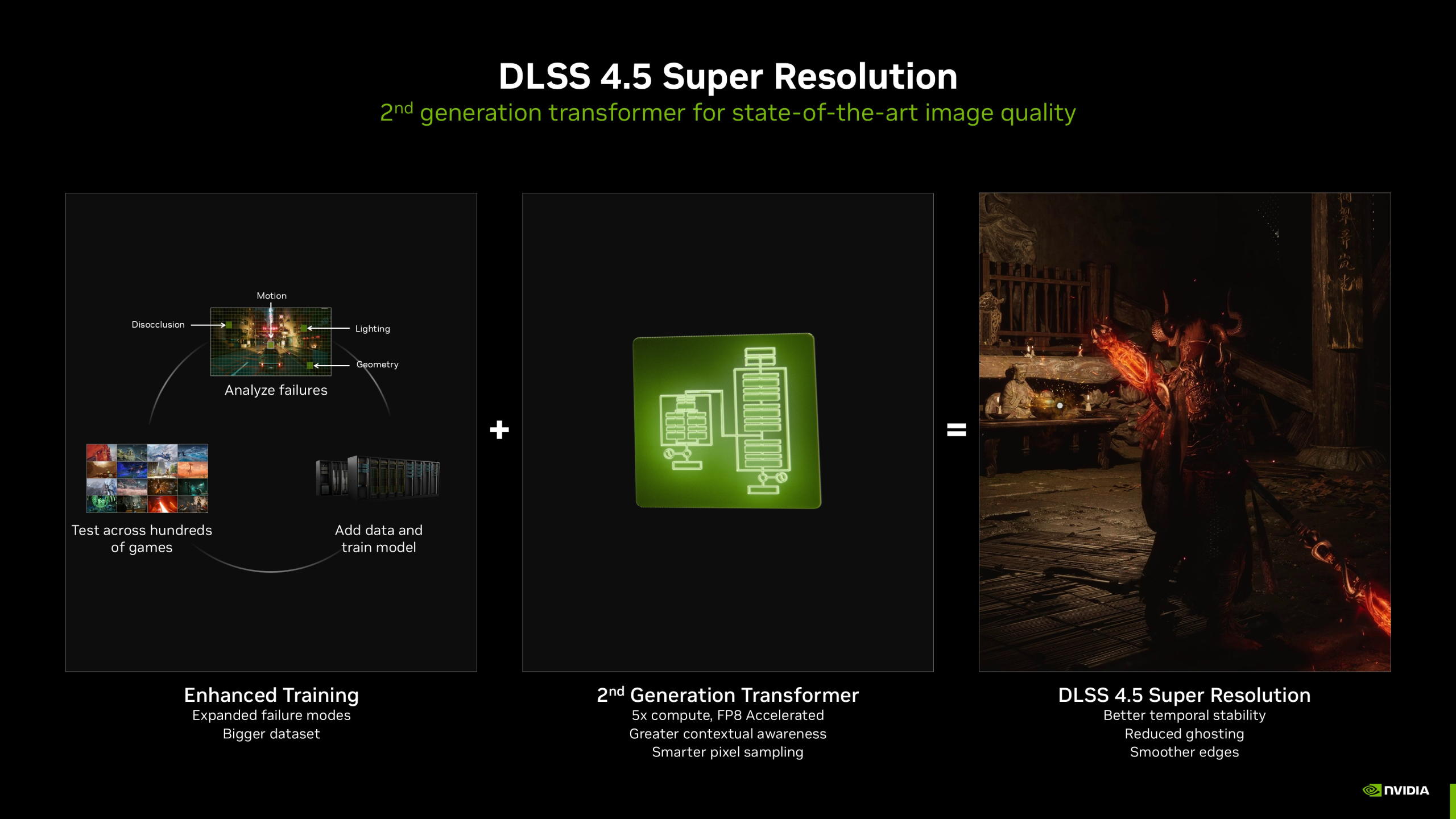
Second-generation transformer model
Unlike earlier upscalers that used convolutional neural networks (CNNs) or first-gen transformer models, DLSS 4.5’s improved transformer model has been retrained on a much larger, high-fidelity dataset of game data and built with significantly more compute capacity. The result is a model that (in theory):
- Better understands spatial and temporal detail in a scene, including lighting, edges, and motion vectors, thus potentially leading to finer detail reconstruction.
- Provides improved temporal stability, meaning potentially less shimmering, fewer ghosting artifacts, and more consistent image quality during motion.
- Potentially handles high contrast elements like neon reflections and bright highlights with more accuracy because it works directly in linear color space rather than a compressed or logarithmic domain.
According to NVIDIA engineers, this new transformer model has roughly five times the inference compute requirement (meaning when executing the actual temporal upscaling algorithm on the GPU) of the previous model, and it intelligently uses both pixel sampling and motion vector data from the game engine to recreate a higher quality image. In real-world terms, that means potentially sharper anti-aliasing, better motion clarity, and improved lighting fidelity compared to the previous DLSS 4 SR model.
Performance vs quality trade-offs
While the new model demands more tensor cores (AKA the hardware units that accelerate AI inference algorithms on NVIDIA RTX GPUs) compute than earlier versions — particularly on older RTX GPUs — on newer RTX 40 and 50 Series GPUs, it benefits from FP8 precision acceleration, helping mitigate the greater performance cost while still potentially delivering superior upscaled visuals.
Since its launch in CES 2026, DLSS 4.5 Super Resolution has been made available in over 400 supported games via the NVIDIA app, spanning RTX 20, 30, 40 and 50 Series GPUs, with easy integration controlled via Model Presets such as Preset M (designed for use with Performance mode upscaling) and Preset L (designed for use with Ultra Performance mode upscaling).
DLSS 4.5 Dynamic Multi-Frame Generation
Beyond temporal upscaling, DLSS 4.5 also expands NVIDIA’s Multi-Frame Generation technology, which is their ML-powered frame interpolation tech that’s designed to insert extra generated frames between rendered ones, boosting smoothness at the cost of extra latency and potentially visible visual artifacts. Although the full rollout of Dynamic MFG and 6X modes is scheduled for spring 2026, the core principles behind the technology are already well documented.
6X Multi-Frame Generation Mode
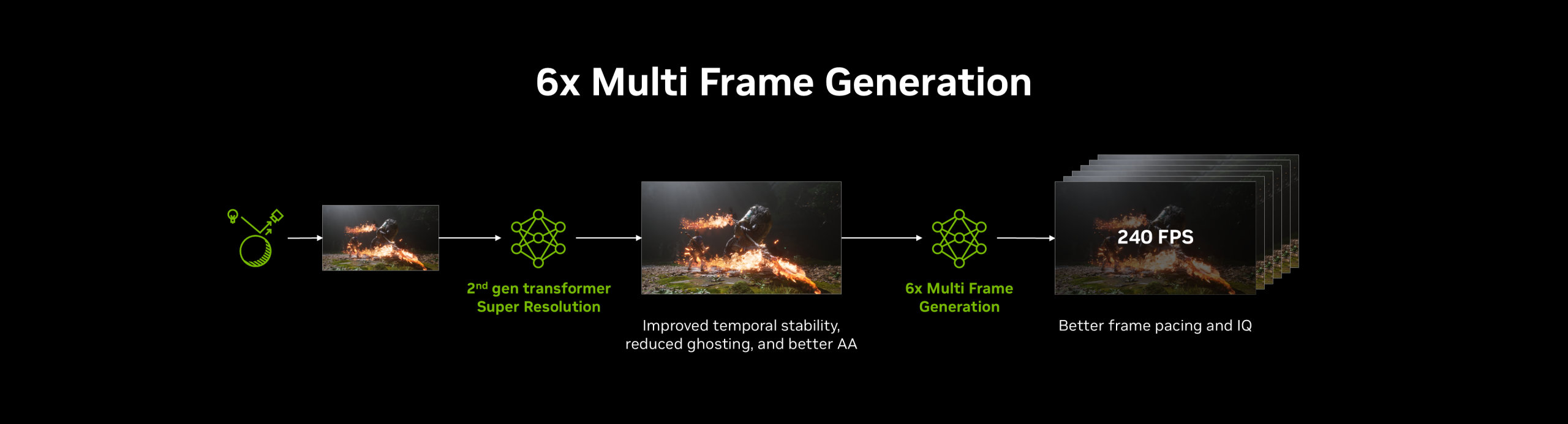
DLSS 4.5 introduces a new 6X Multi-Frame Generation mode (up from the previous max 4X MFG mode), which can generate up to five extra frames for each rendered frame. This can significantly increase perceived smoothness on high refresh monitors (especially 240 Hz and up), notably in GPU-heavy workloads like real-time path-traced games, provided the pre-MFG base framerate is high enough to mitigate any added latency and visual artifacting from the AI-generated frames.
Dynamic Multi-Frame Generation
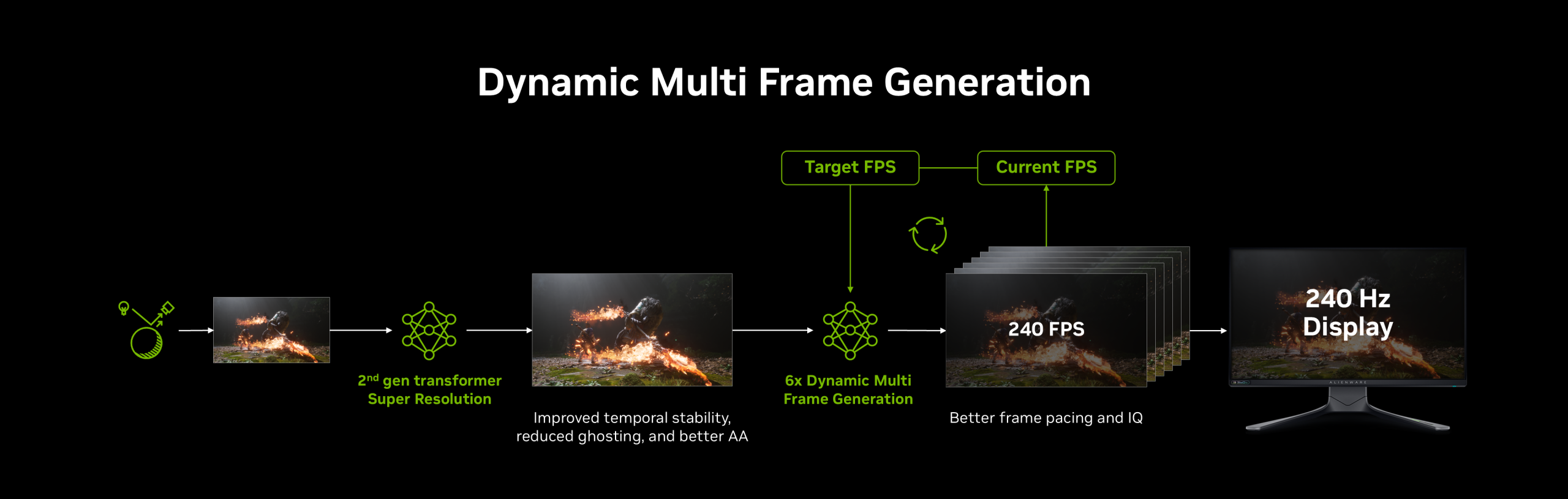
Whereas earlier DLSS 4 MFG tech was more static in its frame generation rate (for example fixed 3X or 4X modes), DLSS 4.5 adds Dynamic Multi-Frame Generation, a system that adapts the number of generated frames from zero up to five in real time based on the balance between your GPU’s performance and your display’s refresh rate (or an arbitrarily chosen framerate limit). In practical terms:
- If your GPU is struggling to hit your target refresh rate/FPS, Dynamic MFG will generate more frames to compensate, thus improving your game’s visual smoothness.
- When the GPU workload eases, it scales back the number of generated frames in order to provide an optimal balance of visual smoothness, system latency, and visual cleanliness.
Just like DLSS Frame Generation and the previous MFG version before it, Dynamic MFG works in conjunction with NVIDIA’s render/system latency reduction technology known as Reflex Low Latency, which is required to keep game responsiveness under control with MFG active. Their combined effect is a more flexible, real-time optimized approach to frame interpolation that scales with your hardware and target refresh rate, assuming your base framerate is high enough and that you’re using it in suitable games.
How to Enable & Use DLSS 4.5 Super Resolution
DLSS 4.5 Super Resolution is now available to all GeForce RTX users via the latest NVIDIA App update and optionally (but preferably) with the latest GeForce Game Ready driver installed. With this update, NVIDIA has refined how Super Resolution Presets are applied, making it easier to leverage the improvements of the second-generation transformer model across your games and applications.
Updating the NVIDIA App and graphics driver
Before enabling DLSS 4.5 Super Resolution in your games, make sure that both your NVIDIA App (which should be automatically updated upon launch) and graphics driver are up-to-date. Just like with the previous DLSS 4 SR model, the new DLSS 4.5 SR model is delivered via Presets (M and L), which can be enforced from the “DLSS Override – Model Presets” setting in the NVIDIA App, either globally or on a per-game basis.
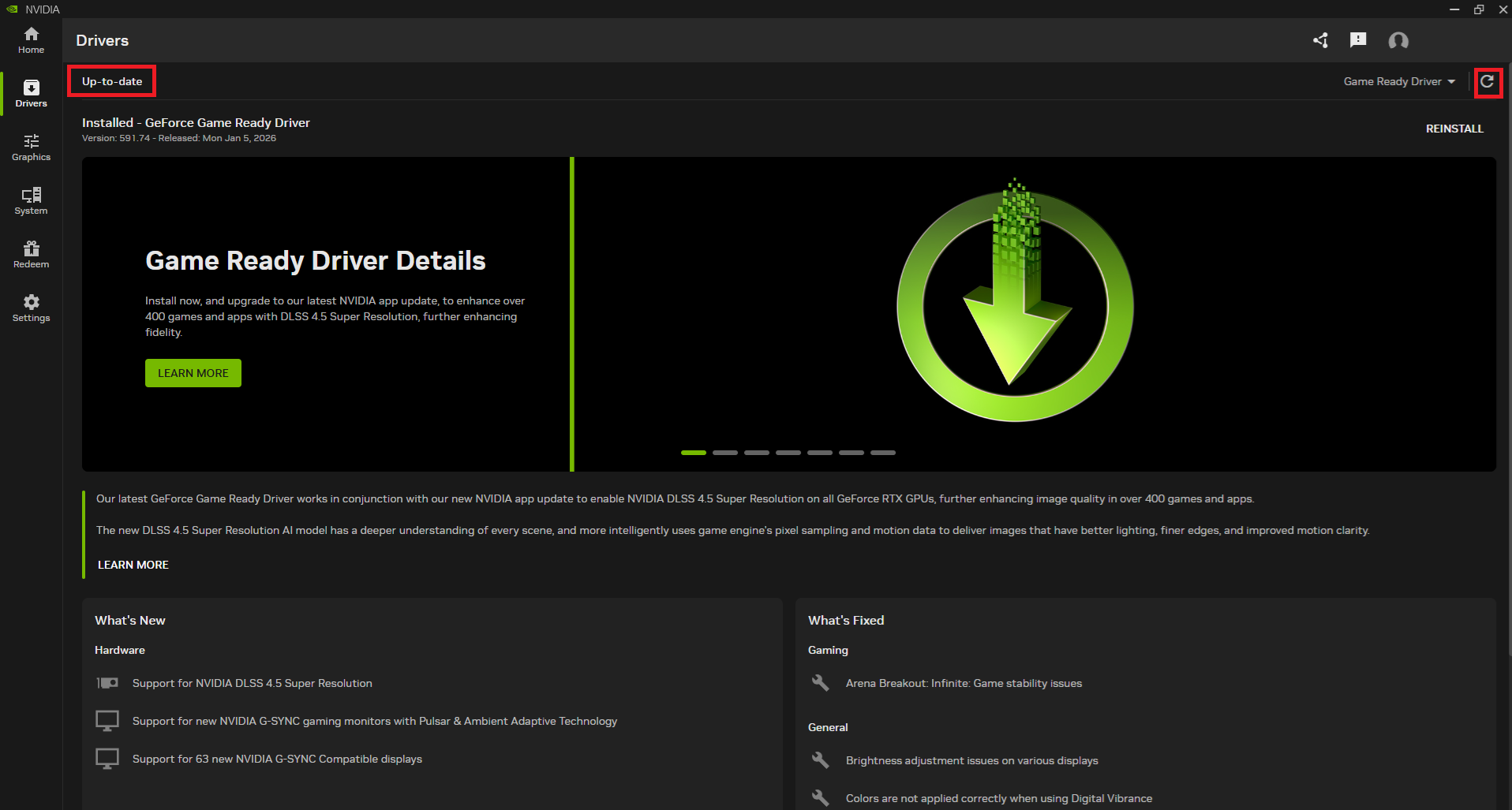
Once you’ve updated the NVIDIA App and your graphics driver:
- Open the NVIDIA App (which can be accessed from a desktop shortcut, the NVIDIA icon in the Windows System Tray, or via a right-click on the Windows desktop) and go to the Graphics tab.
- Either select a specific game from the detected list in the “Program Settings” section or instead access the “Global Settings” to apply a Super Resolution Preset override globally for all your games that support a DLSS SR override.
- Scroll to the “DLSS Override – Model Presets” setting under the “Driver Settings” section, then choose your preferred SR model/Preset override options.
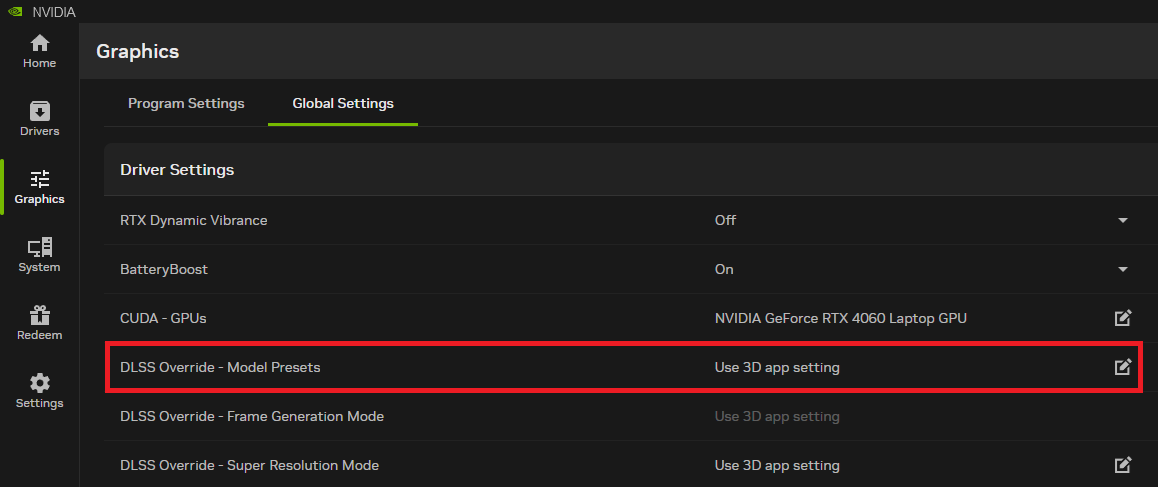
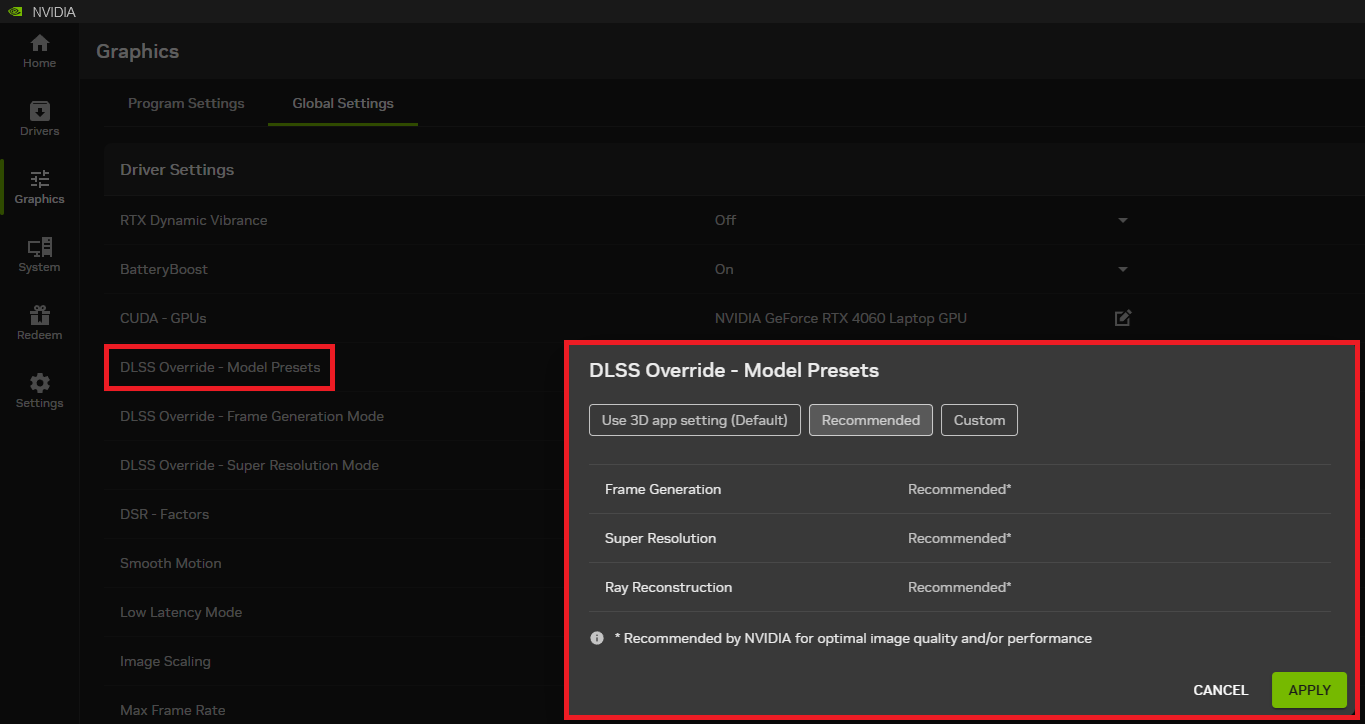
“Recommended”, the new preferred Super Resolution override setting
In prior versions of the NVIDIA App, this override menu used a Preset labeled “Latest” to automatically select the most recent DLSS SR model/Preset combinations available. With DLSS 4.5, NVIDIA has replaced that option with a new Preset called “Recommended”. This change is designed to match the appropriate Super Resolution model to your selected quality mode. It works in the following way:
- Model M gets applied to Performance mode (50% per resolution axis).
- Model L becomes the preferred option for Ultra Performance mode (33% per resolution axis);
- Model K gets used in the other SR modes, which include DLAA (100% per resolution axis), Quality (67% per resolution axis), and Balanced (58% per resolution axis).
Using the “Recommended” option ensures that the NVIDIA App override will choose the best DLSS Super Resolution transformer model/Preset combo for the applied upscaling mode. This approach provides more flexibility in terms of balancing out upscaling fidelity and cost. Do note, however, that pre-RTX 40 Series GPUs (RTX 20 Series and 30 Series GPUs) will greatly underperform with both new DLSS 4.5 2nd gen transformer Presets, as their tensor cores do not support ML inference with FP8 precision.
Verifying the feature in-game
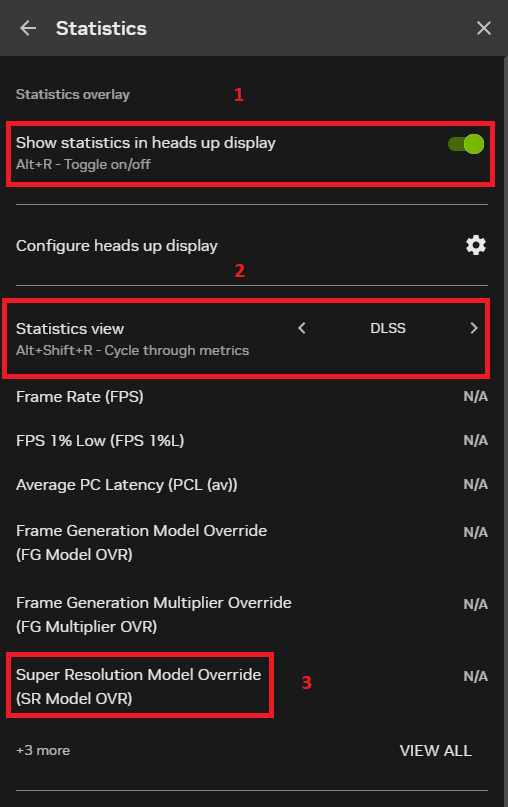
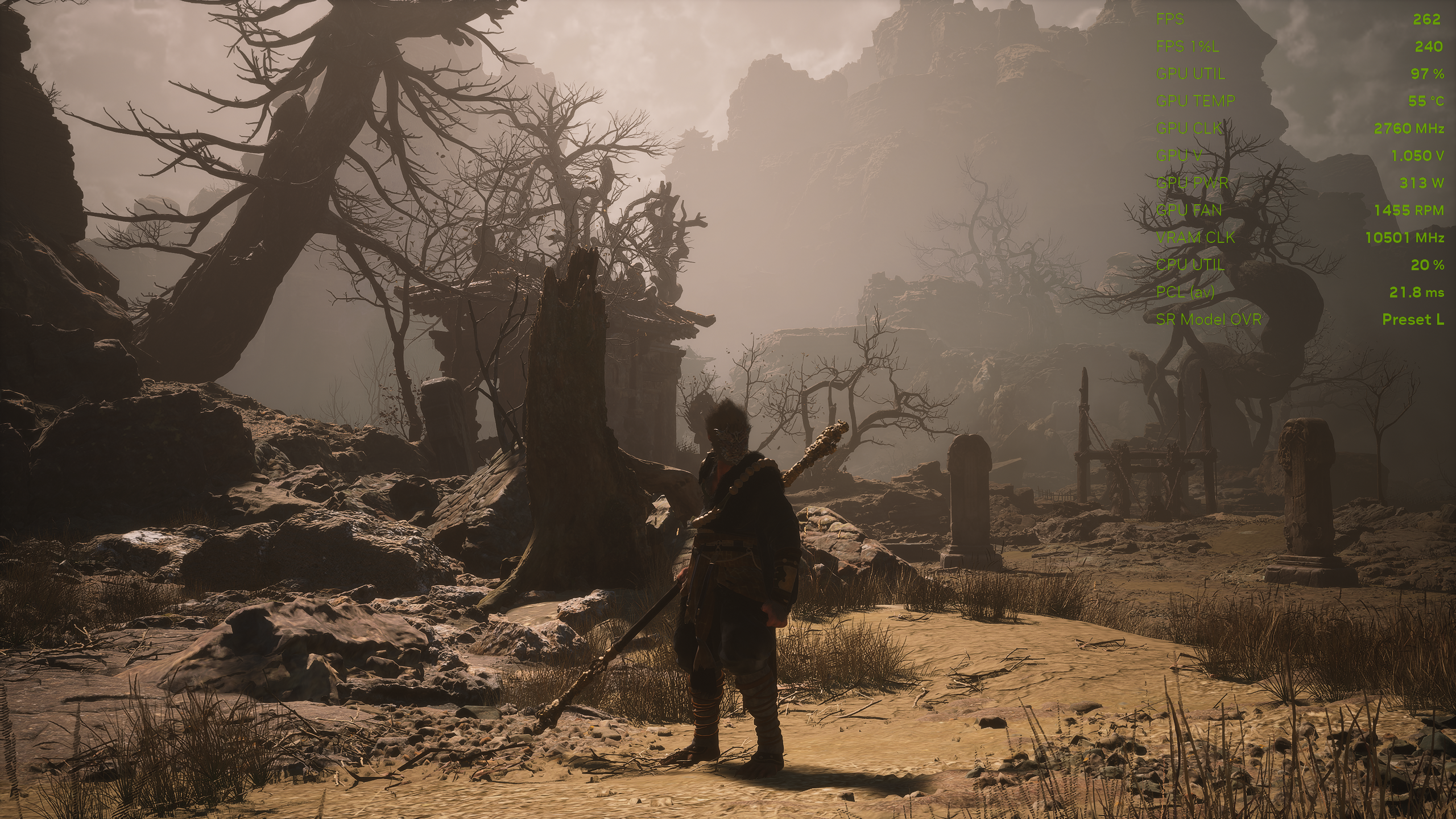
Once you’ve set up your SR overrides, you can double-check which upscaling Preset is active by enabling the NVIDIA App’s in-game performance overlay, which you first need to access and set up by hitting the hotkey combo of ALT+Z, then accessing the “Statistics” menu, which is located at the bottom of the overlay settings interface:
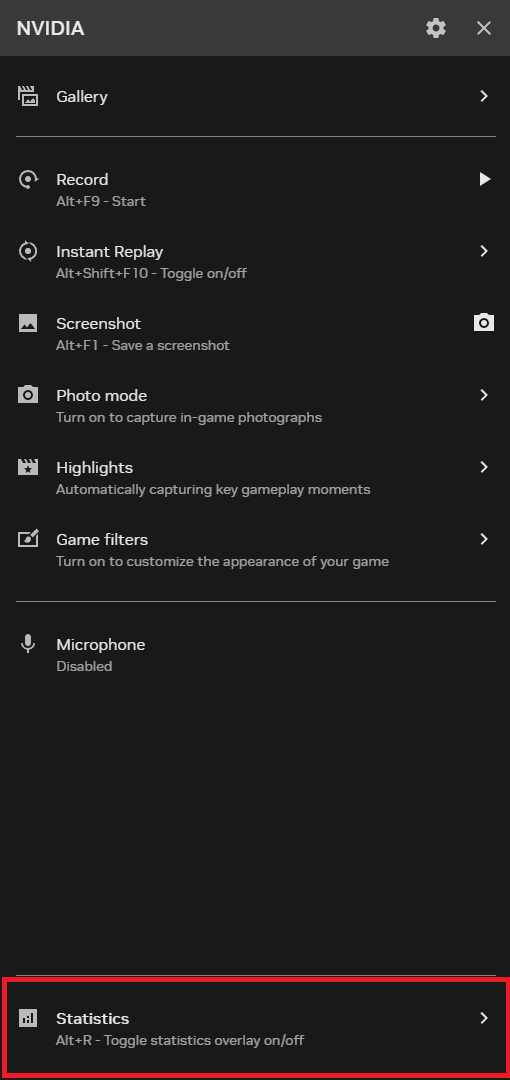
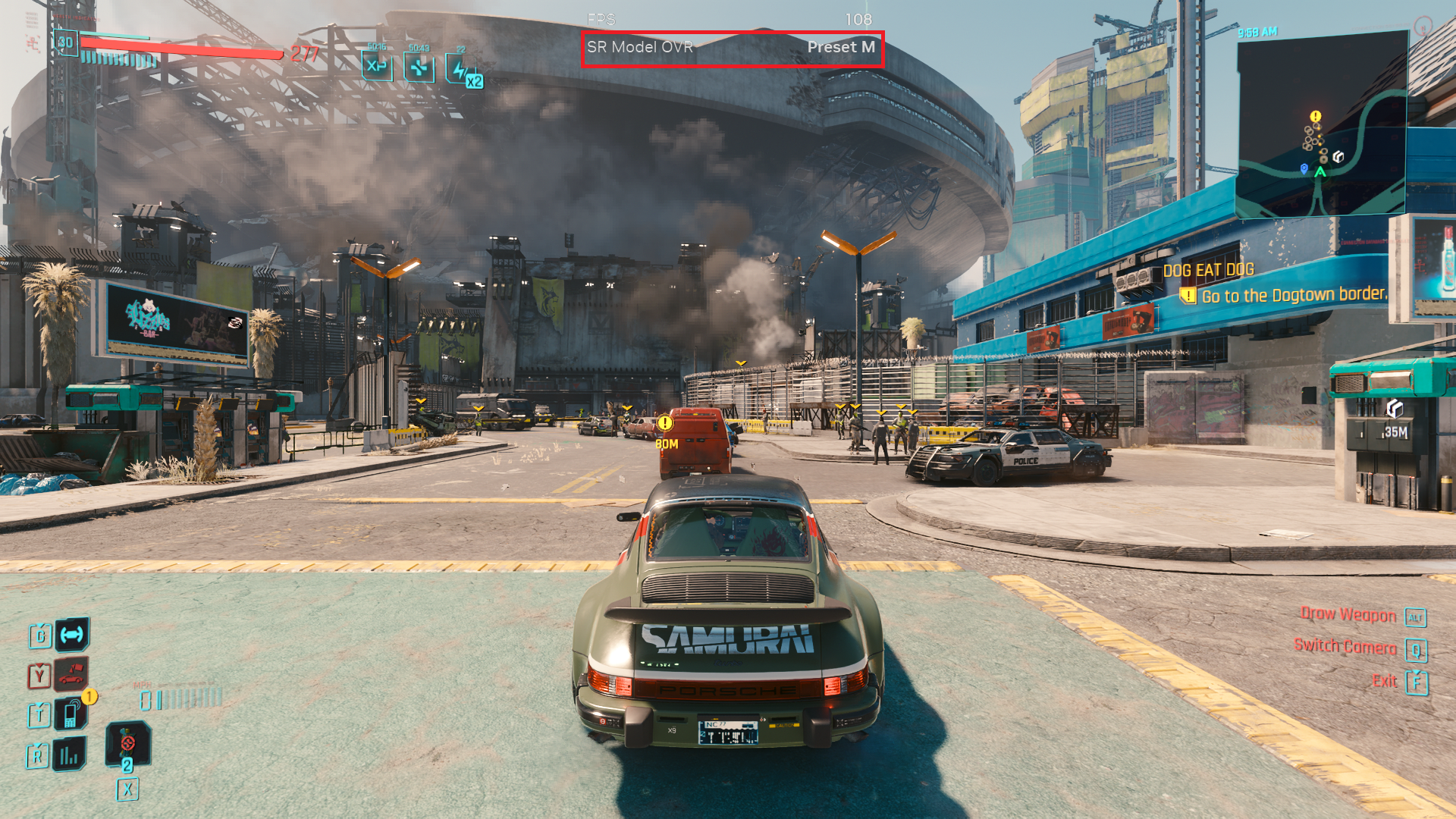
Then, once in the “Statistics” menu, enable the on-screen display overlay by toggling on the “Show statistics in heads up display” setting, then choose either “DLSS” or “Custom” in the “Statistics view” option. What you want to show in the overlay is the “Super Resolution Model Override (SR Model OVR)” indicator, as that’s what will tell you which SR Preset is currently active/being overridden in your game. If you’ve chosen the “Custom” overlay view, then you’ll have to scroll down in the overlay options and make sure that the “SR Model OVR” indicator is ticked, in order for it to be shown.
Finally, launch a game where you want to check your current DLSS Super Resolution mode override settings, and make sure that the NVIDIA App overlay is showing the SR model that you’re expecting.
Important note: The new DLSS SR 4.5 upscaling model is incompatible with DLSS Ray Reconstruction at the moment, and using DLSS RR alongside it (via a Preset override from the NVIDIA App, for example) will simply run the game with the older DLSS RR combined upscaling/denoising model, which is still on the first-generation transformer architecture.
Visual Comparisons: DLSS Super Resolution 4.5 in Action
To get a clear picture of how DLSS 4.5 Super Resolution stacks up against DLSS 4 SR, we need to perform visual comparisons that combine both static screenshots and side-by-side video footage — that is slowed down to 50% playback speed — at various resolutions and upscaling mode/Preset combinations, because still images alone often miss what really matters in motion, such as shimmering, ghosting, disocclusion artifacts or temporal instability that become visible only when game frames are moving. Static shots can be useful for isolated detail, but real-world gameplay visual fidelity is best judged in motion.
We’ll be exploring these comparisons in five modern games: Assassin’s Creed Shadows, Black Myth: Wukong, Grand Theft Auto V Enhanced, Cyberpunk 2077, and Horizon Zero Dawn Complete Edition.
Each of these five games is using a different game engine, and thus is liable to potentially highlight both the strengths and weaknesses of DLSS SR’s ML-based temporal upscaling approach.
Cyberpunk 2077 (1080p)
Static screenshots:
Video footage:
Assassin’s Creed Shadows (1440p)
Static screenshots:
Video footage:
Black Myth: Wukong (1440p)
Video footage:
Grand Theft Auto V Enhanced (4K)
Static screenshots:
Video footage:
Horizon Zero Dawn Complete Edition (4K)
Static screenshots:
Video footage:
Analysis of the image quality comparisons
In the static screenshots image quality comparisons, we can see that the new DLSS SR 4.5 model brings extra detail, crispness, and especially sharpness to the image, oftentimes resulting in a detailed albeit oversharpened image output. However, the main strength of the new second-gen transformer upscaling model is its ability to upscale from a lower resolution input, and this is reflected in NVIDIA’s choice to recommend Preset M for Performance mode and the even heavier and more visually impressive Preset L, which is meant to be used with Ultra Performance mode and has actually made it very viable to use at 4K and above output resolutions, and sometimes even 1440p — depending on the game scene — at least in our subjective opinion.
On the other hand, in the video footage image quality comparisons, we can see that the new upscaling model does bring visual quality improvements in motion, such as less ghosting, shimmering, and disocclusion artifacts, and also more temporal stability. Unfortunately, it’s still not perfect, as we also saw it sometimes exacerbate foliage rendering artifacts that were already present with Preset K and even introduce visible and distracting flickering in foliage. With that said, the new model does indeed shine in the higher performance upscaling modes (Performance and Ultra Performance) and sometimes allows matching the visual quality of higher quality upscaling modes from the previous state of the art upscaling model, not to mention being able to overall best the often lackluster temporal upscaling/anti-aliasing solutions that are included in most modern game engines, even when running at native resolution.
Performance Considerations
Across multiple community reports and early testing, DLSS 4.5 Super Resolution tends to impose a higher performance cost than DLSS 4 SR’s 1st gen transformer model because the new 2nd-gen model uses significantly more tensor core compute for its enhanced image reconstruction. The added compute burden can lead to noticeable performance reductions versus DLSS 4 SR at the same upscaling mode, especially on older RTX GPUs that lack FP8 precision support.
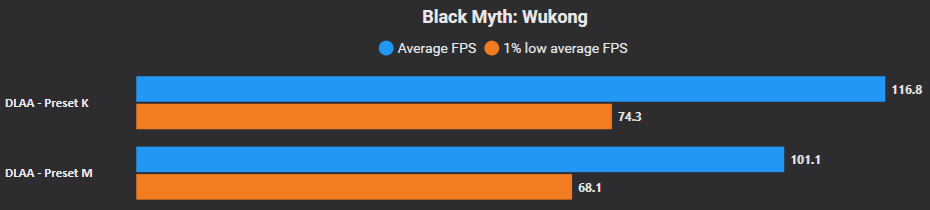
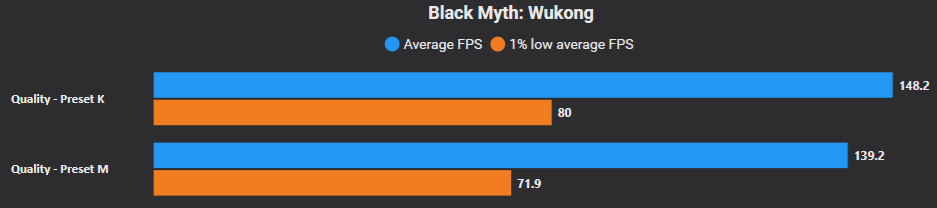
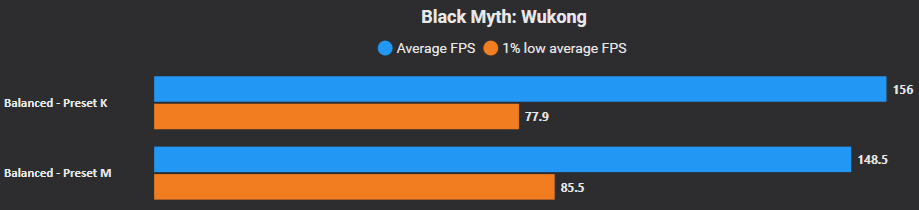
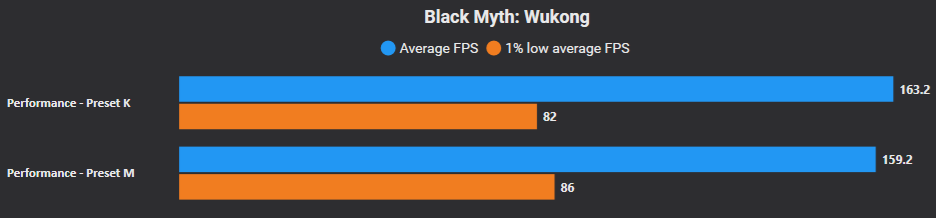
To measure the performance differences between DLSS SR 4.5 vs 4 across all upscaling modes (including the native resolution DLAA mode), we will be performing benchmarks using CapFrameX in Black Myth: Wukong at a resolution of 2560×1440 and using the High graphics Preset, on a system that is equipped with an NVIDIA GeForce RTX 4090 GPU, and is also fully updated software wise. We have obtained the following results:
DLAA mode performance comparison (Preset M vs Preset K)
Quality mode performance comparison (Preset M vs Preset K)
Balanced mode performance comparison (Preset M vs Preset K)
Performance mode performance comparison (Preset M vs Preset K)
Ultra Performance mode performance comparison (Preset L vs Preset K)
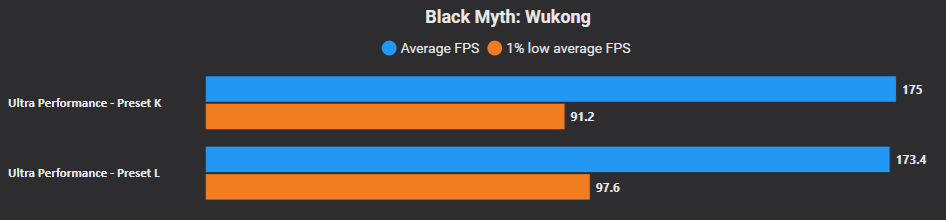
From the aforementioned performance comparison benchmarks between DLSS 4.5 SR and its predecessor in Black Myth: Wukong at 1440p, we can surmise that the new upscaling model is indeed heavier to run on the GPU, and that the greater the rendering resolution, the greater the performance impact!
Tip: You can experiment with the various DLSS SR model/Preset combinations in your games and attempt to strike an optimal balance between performance and perceived visual fidelity in your specific game/scenario. For example, you might find that in some cases, DLSS SR Preset M Performance mode might look about the same as SR Preset K Quality mode in some games/scenes, while actually outperforming it in terms of raw framerates.
Final Words
Across the games tested in this article, DLSS 4.5 Super Resolution delivered noticeable improvements in visual quality compared to its predecessor. In many cases, we saw sharper anti-aliasing, improved temporal stability, and reduced ghosting and shimmering, particularly in fast-moving scenes or high contrast lighting scenarios. However, the latest DLSS 4.5 SR model is far from perfect, as we also saw overly sharpened visuals, increased flickering, and boiling in foliage rendering in certain games.
However, those gains came with real performance trade-offs. Unlike older upscaling models that often increased performance with minimal quality cost, DLSS 4.5 SR’s more advanced upscaling model demands significantly more AI compute grunt, especially on GPUs without FP8 acceleration. Community tests have found considerable performance drops on RTX 20 and 30 Series GPUs versus DLSS 4 SR, particularly at higher quality modes, making it harder to justify the visual uplift on those older GPUs unless image quality is your utmost priority.
Visually, the new Super Resolution model did not universally eliminate all artifacts: in some games, certain details still felt overly sharpened or exhibited minor reconstruction errors. These regressions are typical of cutting-edge AI upscaling models at launch and suggest that while DLSS 4.5 SR often surpasses DLSS 4 SR in fidelity, it isn’t a perfect replacement in every scenario. Real-world testing in multiple titles remains essential to picking the right Preset for your games and preferred visual profile.
Looking ahead, the ecosystem of DLSS 4.5 continues to expand. Dynamic Multi-Frame Generation and the new 6X MFG multiplier — coming later in spring 2026 for RTX 50 Series GPUs — promise to further improve MFG’s usefulness, especially on high refresh rate monitors in the most suitable games.


In summary, DLSS 4.5 Super Resolution represents a meaningful visual step forward, offering clearer images and improved motion clarity that most players will appreciate in supported titles. However, there are performance costs (especially on older hardware) and occasional visual regressions that mean it won’t be the best choice in every situation or game.
Follow Wccftech on Google to get more of our news coverage in your feeds.
VIA: wccftech.com